
Git Integration
Git operations run on the server machine in the project repository. The desktop app visualizes and triggers them; it does not copy a remote repository to the client.
Main repository or worktree
At card creation, choose whether the agent works in the main project path or an isolated Git worktree.
- Main repository is simple but concurrent tasks can touch the same files and index.
- Worktree creates a separate working directory and branch for the card, isolating its filesystem and Git index.
Worktrees require a valid Git repository and a column eligible for worktree execution. Stib can generate a branch name from the card or accept a custom one. Every branch Stib creates for a card carries its number: a custom fix/scroll is saved as fix/card-<id>-scroll, and a name with no room left for the number is refused. Creating a worktree does not commit, push, merge, or open a pull request by itself. Before creating it, Stib fetches the base branch from its remote (about fifteen seconds at most, once per branch and per half minute) so the card starts from up-to-date code: a local branch that is behind is fast-forwarded when no worktree uses it, otherwise the card starts from the remote branch. If the remote does not answer, the card starts from the local branch.
Project worktree policy
A project can decide for its cards in Project settings → Git, a tab shown for Git repositories only.
Worktree for new cards:
- Optional, off (default): the creation form offers a worktree, switched off.
- Optional, on: the form starts with the worktree switched on. It can still be turned off.
- Required: every new card gets its own worktree, whatever created it — form, CLI, API or integration import.
- Forbidden: every new card works in the main repository. Preparing a worktree from the board and forking a conversation into a new card are refused.
The policy applies when a card is created; existing cards keep their own setting. An existing card can still be switched to match the policy, never away from it. The two optional modes only preset the forms: the CLI and the API keep their own default, which is a worktree.
Default base branch: the branch a new worktree starts from when its creation names none. A remote branch (
origin/dev) is accepted. Empty means the branch the main checkout is on.Name branches with AI: when nobody typed a branch name, Stib generates one from the card's prompt at the moment it creates the worktree, with the same credential as the ✦ button of the form, and adds the card's number to it (
fix/card-<id>-scroll-jump). If that fails, the branch is named after the card (feat/card-<id>-<title>).
Card Diff tab
The card panel's Diff tab follows changes for the card's active repository/worktree. Use it to review files before sending guidance or moving the card. A cancelled or failed agent can still leave a valuable diff.
Generated files flooding the list (build output, logs) can be excluded from it: right-click a file, a selection or a folder, then Add to .gitignore. Stib appends one exact rule per path (/path/to/dist/ for a folder) to the .gitignore at the repository root. A rule has no effect on files Git already tracks: when the target contains some, Ignore and stop tracking also removes them from the index. They stay on disk, and their removal appears under Staged, ready to commit with the .gitignore. The same menu exists in the project's Git workspace.
Git workspace
Open a project's menu and select Git repository.
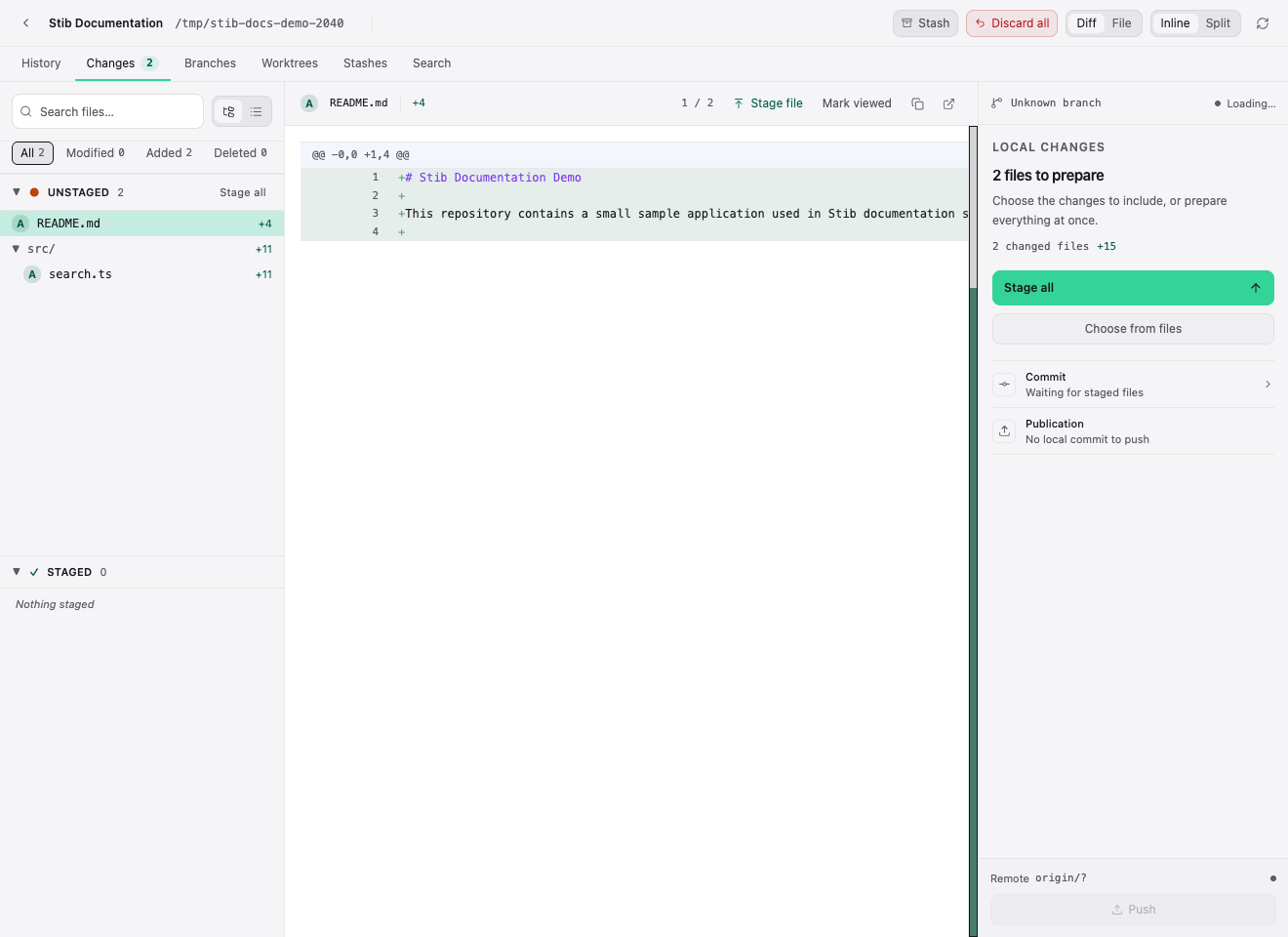
The workspace includes:
- History — commit graph and commit details;
- Changes — staged/unstaged files, hunks, diff, stage actions, and commit preparation;
- Branches — local and remote branch information;
- Worktrees — linked working directories and their branches;
- Stashes — repository stash entries;
- Search — find commits or repository history.
Desktop-only actions can open a file in the preferred editor or reveal the project. Remote operations depend on the repository's configured credentials and provider.
Safe review sequence
- Confirm the repository/worktree shown in the header.
- Refresh changes and inspect untracked, unstaged, and staged files.
- Review the complete diff, including generated or lock files.
- Run the project validation commands.
- Stage deliberately and write a meaningful commit.
- Push or create a review using your normal Git provider workflow.
Stib protects some operations when uncommitted changes would be lost, but it cannot infer whether every generated file is intentional.
Cleanup
Column settings can clean a worktree on transition, and project tools can remove eligible worktrees in bulk. Cleanup may be blocked when a worktree contains uncommitted changes or another process uses it. Review and preserve important work before cleanup; an archive of the card is not a backup of uncommitted files.
Next: Cards and Desktop Features.