
Agents
Stib presents a common workspace over several coding-agent runtimes. Provider capabilities differ, so the server discovers and reports what a credential can actually do instead of promising identical behavior everywhere.
Selection and inheritance
Credential, model, and agent runner follow separate rules:
- Credential: card override → project default → organization default → global default → provider CLI/keychain fallback when available.
- Model: card override → active-column default → project default → organization default → compatible credential default → concrete runner fallback. Columns, projects and organizations set one model per runner: a card only reads the entry for the runner it runs on, so a column can say “Sonnet on Claude Code, GPT‑6 Astra on Codex”.
- Agent runner: an explicit compatible card choice wins. Otherwise Stib keeps a compatible current choice, uses the board default when compatible, or selects a runner compatible with the effective credential provider. Native-auth runners can ignore an unrelated inherited credential.
The selector shows credential, provider agent, model, and—where supported—reasoning effort. Passive columns do not contribute a model default. A locked, over-quota, expired, or incompatible credential is not silently substituted without an explicit fallback rule.
Automatic subscription failover
The explicit fallback rule is opt-in, per subscription. In an account's Settings, Usage limit › Switch to another subscription adds it to a relay group: the ticked subscriptions of the same provider, in the same space (server accounts together, one user's personal accounts together), relay each other.
When a card's run is refused because its subscription reached its usage limit (a Claude 5-hour or weekly window, a Codex limit), Stib moves the card to the least used subscription of the group and resumes it with its conversation — even when automatic resume after a quota is turned off, since the failover is its own opt-in. Cards launched afterwards go straight to a relay until the first subscription refills; they do not return to it on their own. A toast says which account ran out and which one took over, with its own sound in Notifications.
Changing the account of a card waiting for credit (on the card, its project, its organization or the server) updates its wait right away. If the new account has credit, the banner turns into Credit available: nothing restarts on its own, Resume now or a message restarts the agent where it stopped, or sends it the message that never reached it. If the new account is out of credit too, the wait takes that account's resume time.
API keys never take part, and an unticked subscription keeps the previous behaviour: the card waits for the reset when it is close enough, or stops with an error.
Allowed runners and credentials
Everything is allowed by default. In the organization settings (Credential tab) and the project settings (Credential tab), Allowed runners and credentials lets an admin remove a runner or a credential:
- the organization admin sets the organization level; a project admin can only remove more for the project, never re-enable what the organization removed;
- removing a runner also covers its future credentials and members' personal credentials;
- the default credential a level hands down cannot be removed, nor its runner: choose another default first;
- a project or organization default that pointed to a removed credential goes back to inheriting.
A card whose credential or runner was removed is not switched silently: its next launch is refused, the message stays in the conversation, and a banner offers to choose another credential. Pickers list removed credentials as unavailable, with the reason.
Agent and Terminal execution
Agent mode uses a structured stream. Stib can display messages, reasoning (according to user preferences), tool calls, questions, context usage, changed files, and a durable session identifier.
Terminal mode opens an interactive PTY for a provider CLI. It is useful for native terminal workflows, but Stib cannot recover the same structured semantics from arbitrary terminal output. See Terminal Mode.
Conversation panel
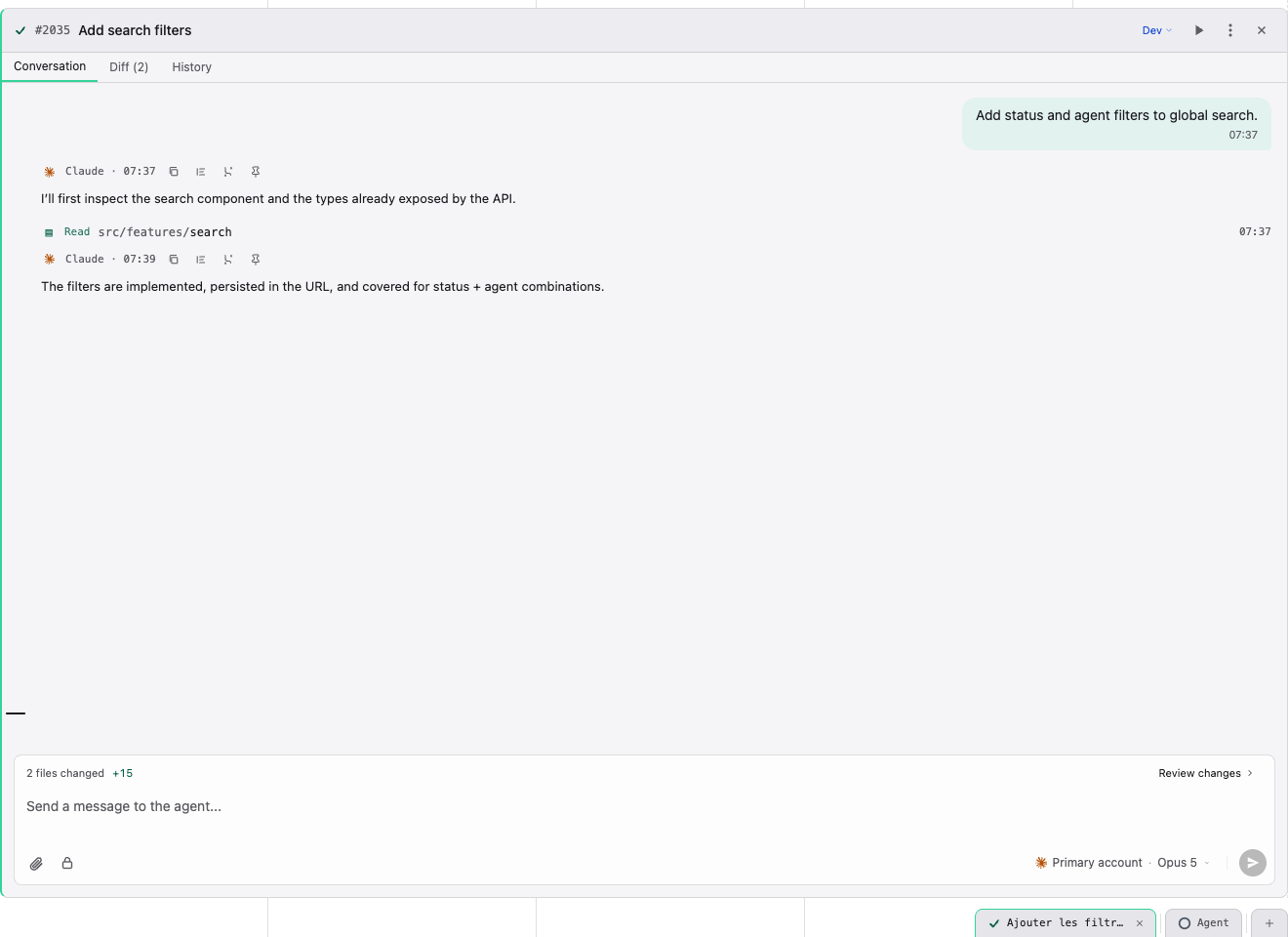
The panel contains:
- conversation, Diff, and History tabs;
- user/agent messages and provider tool events;
- interactive questions and plan approval when supported;
- changed-file summary and review action;
- composer with attachments, file mentions, slash commands, and a masked secret action;
- credential/model switch for the next turn where the provider allows it.
On an idle Claude card, the empty composer may show in grey the reply you would likely send. On desktop, Tab takes it as an editable draft; on mobile, tap it above the field. Nothing is sent without you, and it hides as soon as you type (and returns if you clear the field) or the conversation moves on.
Masked secrets are sent through the dedicated flow and are not saved as normal conversation text. They can still reach the selected agent process, so only send a secret that process is authorized to use.
Agents can hand secrets to each other the same way. When an agent replies to another card, it can attach a secret it holds, a value it produced, or a vault secret by name. The receiving agent gets a private file path, and the conversation shows the message with the sending card's chip and one tile per secret, never the value. Attaching a secret takes edit rights on the receiving card; across projects, the agent holds them only when the person it acts for is a contributor or above there.
Controls
- Run/Activate starts deferred work.
- Cancel requests cancellation of the active process.
- Retry starts another session using the card state and selected settings.
- Compact now, in the model picker, compacts the agent's context on demand when the agent is idle and the provider supports it.
- Pop out opens a conversation in a separate desktop window.
- Multi-panel mode keeps several cards visible; configure its limit in User settings.
Cancellation is cooperative first and forceful when necessary. Always inspect repository state after interruption: a cancelled process may already have written files.
Messages written while the agent was working stay queued after a cancellation, and the agent does not restart on its own: the queue is “on hold”. Send, on its pill or at the bottom of its panel, starts a turn with the first message; the others follow at the end of each turn. A message typed afterwards takes the whole queue with it.
Context and continuity
Each provider manages its own context window; the context usage indicator shows how full it is. By default the agent compacts on its own when the window fills: it summarizes the conversation for itself and carries on.
For Claude Code and OpenCode, compaction can be Automatic or Manual:
- per subscription, with the Auto compaction switch in Settings › Credentials;
- per card, in the model and reasoning picker, when creating the card or during the conversation: Auto compaction (Compaction on mobile) follows the credential, or forces Automatic or Manual.
To compact on demand, use Compact now in the same picker (when the agent is idle and the provider supports it), or type /compact where the provider understands it (Claude Code, Grok, OpenCode, …).
If a conversation still outgrows the model's window, the turn stops with Context full, right where it stopped in the conversation, for every provider. When the provider compacts on demand, Compact summarizes the older exchanges and carries on; otherwise the message only explains what happened. When automatic compaction is off on the card, the message says so and links to the card setting.
If the provider can no longer resume the card's session — its transcript was purged or became unreadable — the turn stops with Session not found. Resume on the end of the history writes the conversation back into a new provider session from what Stib stores, then picks up your last message. Only messages and replies are replayed, not tool calls or reasoning. The action is offered only for providers whose session Stib can write.
Every stopped turn shows the same thing on web and mobile: a title, one sentence, the actions that apply, and the provider's own diagnostic folded under Technical details (secrets removed). An answer cut by the model's output limit shows Answer cut off (output limit) with Continue.
Plan mode, native questions, skills, subagents, goals, and mid-turn messaging are capability-gated. The interface disables or explains unsupported actions.
Global Agents hub
Open Agents from the top bar to review running, waiting, completed, failed, or unread conversations across the current organization. Filters and grouping help return to work without first locating its board. Stopping a background task here affects the same server-side session shown on the card.
Failures
An agent error does not automatically mean its filesystem work vanished. Read the final message, tool output, and diff; then decide whether to retry, send guidance, move the card, or clean its worktree. Authentication and quota errors should be fixed in Credentials before retrying repeatedly.
Next: Pipeline, Git Integration, and Settings.